
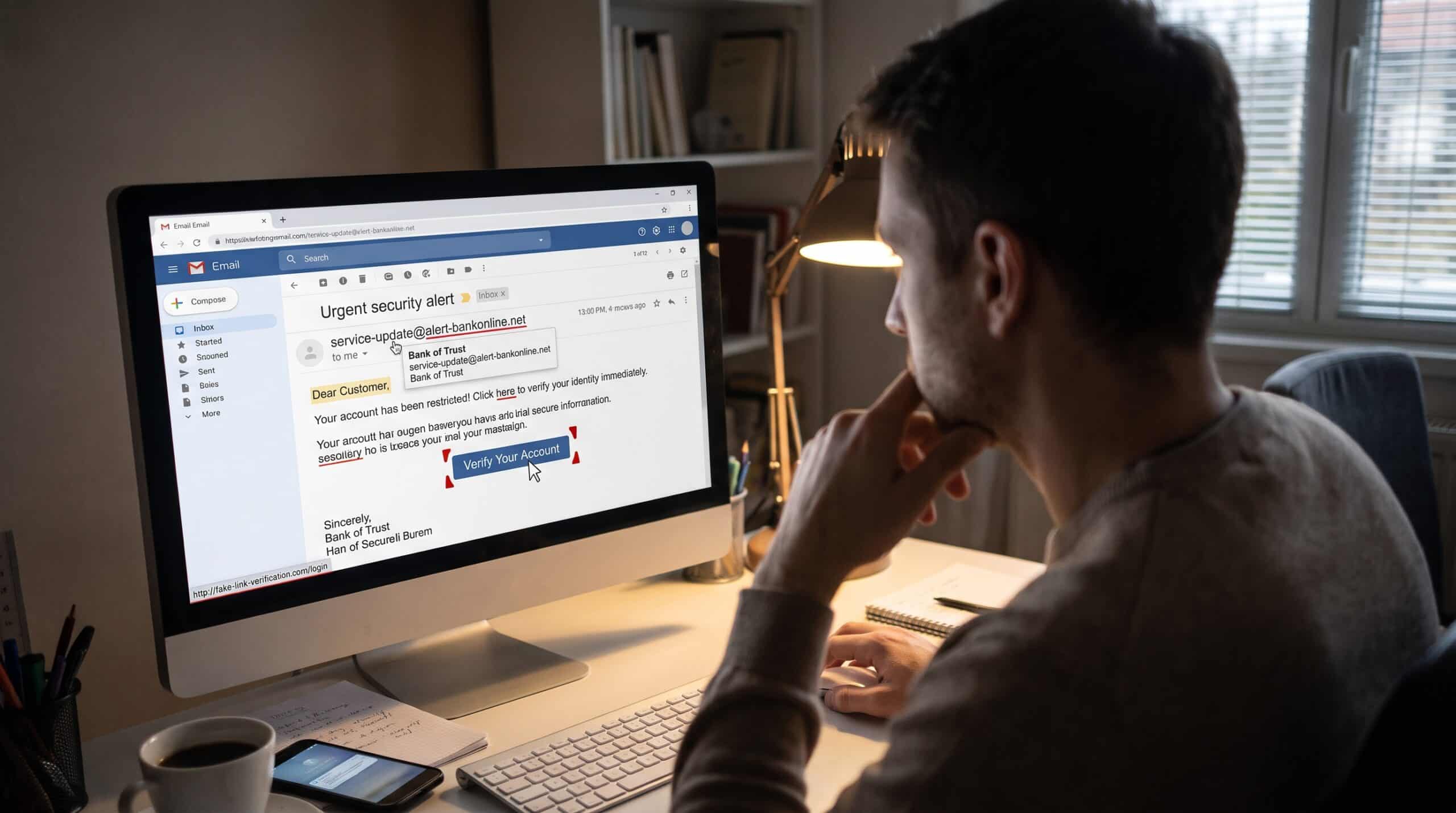
The message arrives at 4:52 on a Friday afternoon, and unless you know how to spot a phishing email, it looks completely normal. It’s from your bank, or it seems to be. There’s a problem with a recent payment, your account will be paused at midnight, and there’s a big blue button to fix it. You’re tired, you want the weekend to start, and the button is right there.
That moment is the one we spend most of our working lives on. As cybersecurity awareness and training specialists, we’ve run thousands of simulated phishing campaigns, sat through the debriefs afterward, and listened to smart, careful people explain why they clicked. Nobody clicks because they’re foolish. They click because the email was built to catch them at exactly the wrong moment.
This guide covers how to spot a phishing email the way we teach it in the room: not as a checklist you memorize once and forget, but as a set of habits that slow you down for the three or four seconds that matter.
Why Knowing How to Spot a Phishing Email Still Matters in 2026
It would be nice to say phishing is an old problem we’ve mostly solved. It isn’t. Phishing emails impersonate a sender you trust, usually to steal a password or to install malware, and the volume hasn’t eased. APWG recorded 3.8 million phishing attacks in 2025, slightly up from 3.76 million in 2024. In the United States, phishing topped the FBI’s list of most reported cybercrimes in 2024, with 193,407 complaints.
The breach data tells the same story from the other side. The Verizon 2026 DBIR attributes 62% of breaches to the human element, up from 60% in the 2025 edition, and phishing still accounts for 16% of initial access in confirmed breaches.
The number that should change how you read your inbox, though, is about speed. Verizon’s Data Breach Investigations Report found that the median user clicks a malicious link just 21 seconds after opening a phishing email, then takes only 28 more seconds to enter the information the attacker wants. That’s under a minute from open to compromise. Twenty-one seconds is not enough time to think. You can barely read a subject line in that window. Everything we teach about how to spot a phishing email comes back to one goal: widening that gap.
The Old Advice on How to Spot a Phishing Email No Longer Works
For years, the first thing anyone learned about phishing was to look for bad spelling. Broken English, odd phrasing, a logo that looked like it was copied off a blurry screenshot. That advice made sense once. Today it’s dangerous.
CISA now says plainly that poor grammar used to be a common sign, but in the era of artificial intelligence, some phishing emails arrive with perfect grammar and spelling. Attackers have the same AI writing tools everyone else does. A phishing email in 2026 can be cleaner, more polite, and better formatted than a real email from your own IT department.
So when people tell us an email “looked totally professional,” we believe them. Polish is no longer evidence of anything. If you want to know how to spot a phishing email today, focus on behavior, not presentation: what the email wants from you, how fast it wants it, and whether the sender is who they claim to be.
How to Spot a Phishing Email: Six Signs That Still Work
Sign One: The Pressure Comes Before the Facts
Almost every phishing email we’ve ever dissected has the same skeleton. First, an emotion. Then, a deadline. Finally, a single action that resolves both.
Fear is the usual emotion (your account is locked, a payment failed, there’s been a login from another country), but curiosity, greed, or a sense of duty work just as well for attackers. A shared document from your manager. A refund you didn’t expect. A delivery you can’t remember ordering.
The deadline is what turns the emotion into a click. “Within 24 hours.” “Before midnight.” “Immediately to avoid suspension.” Real organizations do send time-sensitive notices, but they rarely threaten you with instant, irreversible consequences in the same breath as handing you a link.
Here’s the habit we teach: when you notice your heart rate pick up while reading an email, treat that as the signal itself. The stronger the push to act now, the more reason to act slowly. Close the email, go to the organization directly, and check whether there’s actually a problem. If there is, it’ll still be there in five minutes.
Sign Two: The Sender Isn’t Quite Who They Say
The display name in your inbox is just text. Anyone can set it to “PayPal Support” or “Human Resources” or your CEO’s full name. What matters is the address behind it, and even that needs a careful look.
Attackers love domains that are almost right. A swapped letter, an extra word, a different ending. CISA highlights lookalike domains with tiny alterations to a familiar brand name, the kind that are easy to miss at a glance. Others add words that sound official, like “secure,” “support,” or “verify,” to a brand name that the real company would never use.
When you’re unsure, compare the sender’s address and name against previous emails from the same organization. If your bank has emailed you from the same domain for six years and this one comes from somewhere new, that’s worth stopping over.
A few more sender details worth checking:
- The greeting doesn’t fit. A company you have an account with usually knows your name. “Dear Customer” or “Dear Valued Member” from a service that normally addresses you personally deserves a second look.
- The reply address is different. Some phishing emails come from one address but ask you to reply to another. Hit reply (without sending anything) and see where it would go.
- The timing is off. A colleague who never emails late at night suddenly sends an urgent request at 11 p.m. It doesn’t prove anything, but it should raise a flag.
Sign Three: The Link in the Phishing Email Doesn’t Go Where It Says
The words on a button or link can say anything. What matters is the destination underneath. On a computer, hover your mouse over the link without clicking, and the real address will appear, usually in the bottom corner of your screen or in a small pop-up. On a phone, press and hold the link to preview it.
Then read the address from right to left, starting from the first single slash. The part just before “.com” (or “.org,” “.net,” and so on) is the real domain. “yourbank.com.accountverify.co” is not your bank. It’s a site at “accountverify.co” that has borrowed your bank’s name as decoration.
Be especially wary of shortened links. CISA treats untrusted shortened links as a red flag in their own right, because they hide the destination completely. Legitimate companies sometimes use them in marketing, but an account alert or security notice has no good reason to.
QR codes deserve a mention here too, because attackers have noticed that nobody hovers over a QR code. A code in an email asking you to “scan to verify your account” moves the whole interaction onto your phone, where the address is harder to inspect and your work security tools may not be watching. That gap matters even more if you work from home and switch between devices all day. If an email asks you to scan something to log in, give it the same suspicion you’d give any other link.
The safest habit of all is the simplest. Don’t use links in unexpected emails to log in anywhere. In one of CISA’s case studies, a busy professional who got burned by a fake payment notice now types retailers’ web addresses directly into the browser instead of clicking email links. It takes ten extra seconds and removes the risk almost entirely.
Sign Four: It Wants Something You Wouldn’t Normally Give
Strip away the branding and the story, and ask a blunt question: what does this email actually want me to do?
The FTC lists the stories scammers tell most often, including claims of suspicious activity or login attempts, a problem with your payment information, or a need to confirm personal or financial details. Each one ends in the same place: you entering credentials, payment details, or personal information on a page they control.
The FTC also makes a simple but powerful point: legitimate companies won’t email or text you a link to update your payment information. That one rule catches a huge share of phishing on its own.
At work, the request looks a little different. Sometimes a vendor asks to change their bank details before the next invoice. An executive might ask you to buy gift cards for a client and send the codes. Or a message claiming to be from IT asks you to approve a sign-in prompt on your phone that you didn’t start. In each case, the request skips a normal process. That skip is the tell. Legitimate requests can survive a phone call to confirm them, while fraudulent ones fall apart.
Sign Five: The Attachment You Weren’t Expecting
Unexpected attachments are one of the oldest tricks, and they still work. The FTC warns that attachments and links in phishing messages can install harmful malware on your device. One of the classic lures it describes is an invoice you don’t recognize.
File names are chosen to be boring and plausible: “Invoice_October.pdf,” “Payment_Confirmation.zip,” “Scan_0042.html.” Watch for files that ask you to enable macros, enter a password to open them, or log in to “view the secure document.” An HTML file attached to an email that opens a login page in your browser is almost always malicious.
If you weren’t expecting a file, confirm with the sender through a separate channel before you open it. Replying to the email won’t help, since the attacker controls that thread. Call, message, or walk over to their desk instead.
Sign Six: Something Just Feels Off
This one sounds unscientific, but we take it seriously. People in our sessions often tell us, after the fact, that something bothered them about an email before they clicked. Maybe the tone was slightly too formal for that colleague, or the signature was missing a detail, or the request came through email when that person normally uses chat.
Your brain is good at pattern matching. It notices when something breaks the pattern of normal communication, even when you can’t say exactly why. In fact, a big part of learning how to spot a phishing email is learning to trust that instinct, the same one that helps you spot fake news before you share it. CISA’s own advice boils down to this: if a message looks suspicious, it’s probably phishing.
Give yourself permission to act on that feeling. Checking an email that turns out to be real costs you a minute. Ignoring a gut feeling about one that turns out to be fake can cost far more.
The Four-Second Check to Spot a Phishing Email
You won’t run a full investigation on every email you receive, and you shouldn’t have to. In training, we boil how to spot a phishing email down to four questions you can ask in about as many seconds:
- Was I expecting this?
- Is it pushing me to act fast?
- Do the sender and link destination actually match who it claims to be?
- Is it asking for something I wouldn’t normally give over email?
If any answer feels wrong, stop. You don’t need to prove it’s phishing. You just need to verify before acting, using a channel you already trust: the official app, a bookmarked website, or a phone number from the back of your card or the company directory.
What to Do When You Spot a Phishing Email
Knowing how to spot a phishing email is half the job. The other half is what you do next, and this is where most people go quiet. They delete the email and move on. That protects them, but it doesn’t protect the colleague two desks over who got the same message.
Here’s the response we recommend:
Don’t engage. CISA advises against replying, opening attachments, clicking links, or even using an “unsubscribe” link. In phishing emails, unsubscribe links mostly confirm to the sender that your address is active.
Report it. At work, use your organization’s report button or forward the message to your security team the way they’ve asked. For personal accounts, most email platforms have a “report spam” or “report phishing” option near the sender’s address or in the toolbar. In the United States, you can forward phishing emails to the APWG at reportphishing@apwg.org, report the attempt through the FTC’s fraud reporting site, and forward text phishing to SPAM (7726).
Delete it. Once it’s reported, get it out of your inbox so you can’t click it by accident later.
Reporting matters more than most people realize. Verizon found that employees who completed recent training reported simulated phishing at a 21% rate, roughly four times the 5% rate among untrained employees. Every report gives a security team the chance to pull that same message out of hundreds of other inboxes before someone else clicks.
What to Do If You Already Clicked
It happens. Security professionals, executives, and people who teach how to spot a phishing email for a living have all done it. The worst thing you can do after clicking is stay quiet out of embarrassment, because the first few minutes are when damage can still be contained.
If you entered a password, change it immediately, starting with that account and any other account that shares the same password. If multifactor authentication isn’t turned on, turn it on now. Kent State’s security guidance also recommends scanning your device with antivirus software and turning on automatic updates.
If it’s a work account, tell your IT or security team right away, even if you’re not sure anything happened. A good security team will thank you, not blame you. If money or financial information is involved, contact your bank directly, and in the United States, report fraud through the FTC’s reporting site. For longer-term habits that limit the damage of any single slip, see our guide on how to protect your privacy online.
We tell every group we train the same thing: the person who clicks and reports in two minutes is far more valuable than the person who never clicks but never reports anything either. Speed of reporting is a skill, and it’s one you can build.
Why Training Helps People Spot a Phishing Email
There’s a fair amount of cynicism about security awareness training, and some of it is earned. A once-a-year slideshow followed by a quiz doesn’t change anybody’s behavior. What does work is practice: realistic simulations, quick feedback at the moment of the mistake, and a culture where reporting is rewarded rather than punished.
The goal was never to make people paranoid about every email. It’s to build a reflex. The same way you glance both ways before crossing a street without consciously thinking about it, you want to glance at the sender, the link, and the request before you act. After a few months of practice, most people tell us that knowing how to spot a phishing email stops feeling like a task and starts happening automatically.
A Final Word
Phishing works because it borrows trust that real organizations and real people have earned. Your bank, your delivery service, your manager, your favorite online store: attackers wear their faces because you’ve learned to believe them.
The defense isn’t to stop trusting anyone. It’s to verify before you act on anything that’s urgent, unexpected, or asking for something sensitive. Slow down for four seconds. Check where the link actually goes. Confirm through a channel you already know. And when something feels off, report it, even if you’re wrong, and especially if you’re not sure.
That Friday afternoon email will come again. Now that you know how to spot a phishing email, you’ll be ready for it.
Frequently Asked Questions
What is the fastest way to spot a phishing email?
Check three things: whether you were expecting it, whether it’s pressuring you to act immediately, and whether the sender’s address and link destinations match the real organization. CISA’s Recognize and Report Phishing guide is a good quick reference.
Can a phishing email have perfect spelling and grammar?
Yes. With AI writing tools, many phishing emails are now flawless, and CISA specifically warns against relying on spelling mistakes as a sign. See CISA’s phishing guidance.
Is it safe to click “unsubscribe” in a suspicious email?
No. In a phishing email, the unsubscribe link can lead to a malicious site or confirm your address is active. Use your email provider’s report or block option instead, as explained in the FTC’s phishing guide.
Where should I report a phishing email?
At work, follow your organization’s reporting process. For personal email in the US, forward it to the APWG, then report it and any fraud through the FTC’s ReportFraud site.
What should I do if I clicked a phishing link?
Change any password you entered, turn on multifactor authentication, scan your device, and tell your IT team or bank right away. Kent State’s Recognize Phishing guide outlines the recovery steps.
How common is phishing today?
Very. APWG counted millions of attacks in 2025, and phishing remains a leading entry point in confirmed breaches. See the Verizon Data Breach Investigations Report and APWG’s Phishing Activity Trends Report.
References
- Cybersecurity and Infrastructure Security Agency. Recognize and Report Phishing
- Federal Trade Commission. How to Recognize and Avoid Phishing Scams
- Federal Trade Commission. Protect Yourself From Phishing Scams
- Federal Trade Commission. Report Fraud to the FTC
- Verizon. Data Breach Investigations Report
- Verizon. 2026 DBIR Executive Summary
- APWG. Phishing Activity Trends Report, 4th Quarter 2025
- HousingWire. Cybercrime Resulted in Record Losses in 2024: FBI IC3 2024 Report
- Kent State University. Recognize Phishing
- Keepnet Labs. Phishing Statistics 2026: Verified Benchmarks, Trends and Costs
- Bright Defense. Phishing Statistics
- Techwalla. How to Spot a Phishing Email: 8 Red Flags to Check